A clearer handover from sales to delivery
Catalog and quote scope provide context for the next steps in the customer engagement.
Solution / Agency and consulting teams
Bring your service catalog, quotes, customer follow-up and social content preparation into one workflow.
HUBZ / DETAILS
For an agency, winning the work and delivering it go hand in hand. The delivery team needs to know exactly what was agreed in the quote; open customer work needs to stay visible; brand content needs the right context. Separate spreadsheets can require the same information to be explained again at every handover.
HUBZ / DETAILS
Describe what you offer in the product and service catalog. Distinguish the commercial scope of a one-off project, recurring service and additional work.
Link contacts, companies, opportunities and quotes. Review the customer need and offered scope in the same system when work moves into delivery.
Use Social Studio to manage brand information, content preparation and the calendar. Connect provider accounts and publishing scope under their own permissions.
Track customer work through tasks, calendars and support records. Use relevant reports to review which work needs the team’s attention.
INSIDE HUBZ
An agency is quoting for setup and ongoing support. Follow the work from pricing the first period to handing the deal over to the people who will deliver it.
Add setup as a one-time line and support as a recurring line. The commercial summary shows the first-period amount and the ongoing monthly amount separately.
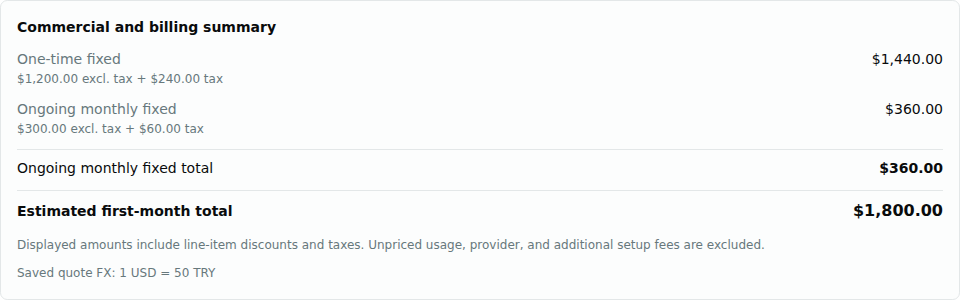
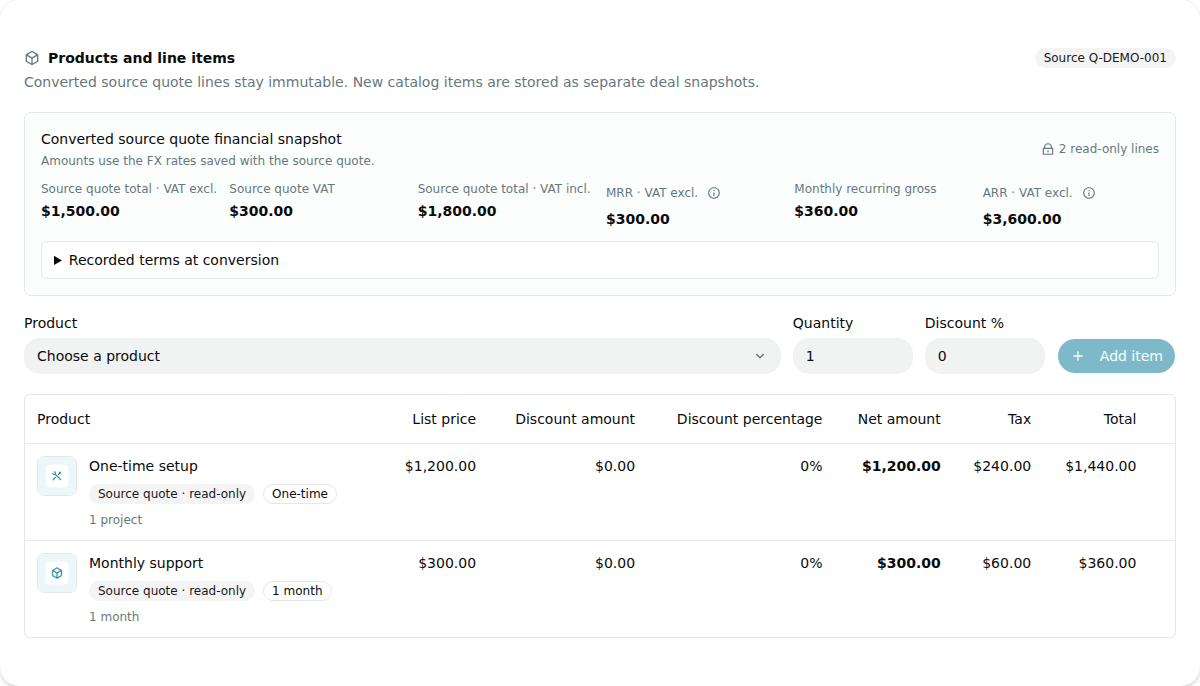
Convert an eligible quote to a deal. The original lines and saved financial summary remain visible on the deal. Any catalog items added later are kept separate.
Open the tasks linked to the deal. Add the kickoff meeting and delivery review, set priorities and due dates, and track progress from the deal itself.
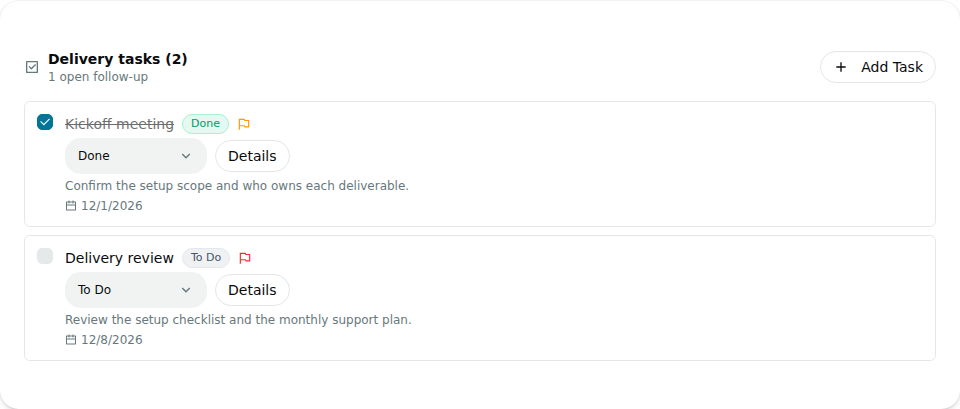
These screens show the working Hubz interface with fictional data prepared for this walkthrough. Prices are examples.
HUBZ / DETAILS
Catalog and quote scope provide context for the next steps in the customer engagement.
Keep logos, colors, graphic rules and content calendars organized together instead of searching different files for the same details.
Present CRM software access separately from content production, design, advertising spend and agency labor.
HUBZ / DETAILS
Organize product and service names, descriptions, prices and commercial details in a catalog connected to quoting.
Record the products and services offered to a customer in quotes, and organize contract drafts, revisions and archives together.
Organize work in lists and Kanban views, keeping customer follow-up visible with an owner and date.
Organize brand rules, content preparation, review, calendars and connected social accounts in a shared workspace.
Manage support as a continuation of the customer relationship, adding knowledge-base, satisfaction and reward records with Business.
Arrange team access through workspace membership, existing roles, enabled modules and connection permissions.
HUBZ / DETAILS
Brand profiles organize content and visual rules. Connected social accounts are limited to five in Professional and twelve in Business in total. A brand profile does not create a separate CRM environment.
If different customers need separate CRM data, workspace, membership and permission arrangements must be reviewed separately. A brand profile alone does not provide data isolation.
No. Social Studio is software access. Content production, design, advertising spend and daily community management are separately scoped agency services.